Multiple Options + TradingView Chart Terminal
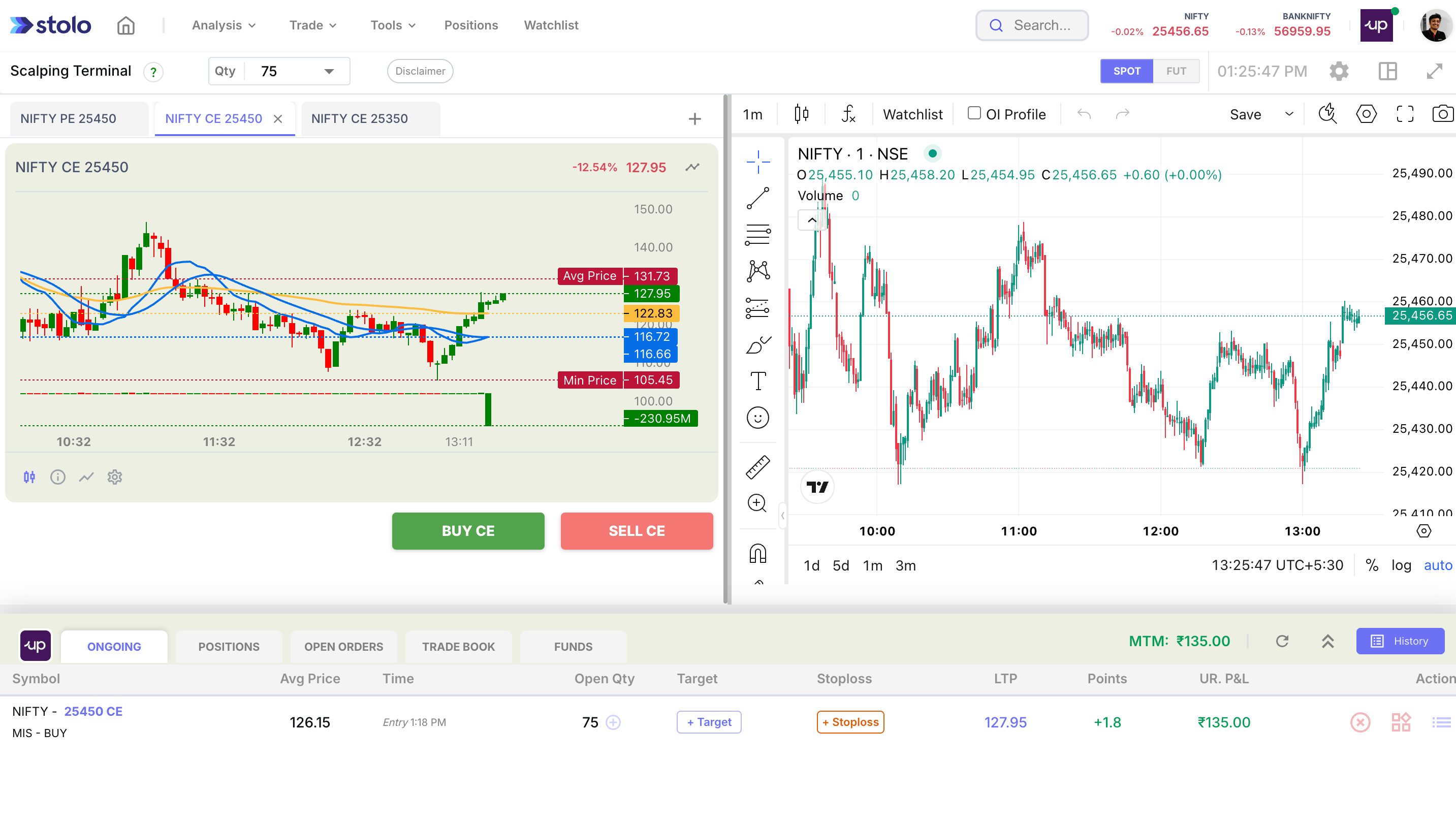
When you're trading multi-leg strategies, watching just one option is never enough. You need a way to monitor, compare, and act across multiple strikes all in real-time. That's exactly what the Multiple Options + TradingView Chart Terminal in Stolo is built for.
What Is This Terminal?
This terminal is a dedicated trading interface designed for traders who:
- Want to track multiple CE/PE legs on a single screen
- Rely on visual charting to detect opportunities
- Need fast comparison and execution during intraday setups
It combines the power of TradingView charting with Stolo's real-time premium feeds.
Who Should Use It?
This terminal is ideal for:
- Straddle & Strangle traders monitoring both legs
- Spread traders analyzing multiple strike combinations
- Scalpers looking for premium divergence between CE/PE legs
- Traders watching IV and premium trends across strikes
Key Features at Glance
- Add Multiple Options - Add any combination of CE/PE across strikes or expiries
- TradingView Chart Overlay - All selected options plotted on a single, interactive chart
- Indicators + Drawing Tools - Use VWAP, Moving Averages, RSI, or plot your own zones
- Live Updates - Premiums, OI, and IV values auto-refresh in near real-time
- Direct Trade Execution - Place or exit trades directly from this interface (with broker connected)
How to Use It
- Go to Trading Terminals and click on Multi Options + TV Chart
- Click on + icon to add multiple strikes across instruments (e.g., NIFTY 22500 CE, 22500 PE, BankNifty CE 55200 etc.,)
- Add multiple option legs to the chart switch between strikes by simply clicking on them to see movements
- Customize the trading chart on the right:
- Switch between Line, Candlestick, or Area chart
- Apply indicators as needed
- Place trades directly and track your orders all under one screen
When to Use This Terminal
- On Expiry Days: Monitor straddles or iron condors for quick exits
- During Volatility: Compare CE and PE spikes to detect bias
- For Trend Confirmation: See if OTM/ATM premiums are expanding in sync
Pro Tips
- Use same expiry + adjacent strikes for clean correlation
- Overlay with premium decay or OI change charts to confirm moves
- Combine with Trending OI or Market Pulse for smart setups
tip
The Multi Options + TradingView Chart Terminal is available on the Flexi Trial and Pro plans. Signup to get started
Frequently asked questions
What is the Multiple Options and TradingView Chart terminal?
A trading interface that combines TradingView charting with Stolo's live premium feeds, letting you add multiple CE and PE legs across strikes and expiries, plot them on one interactive chart, and place or exit trades from the same screen.
Who should use it?
Straddle and strangle traders watching both legs, spread traders analysing strike combinations, and scalpers looking for premium divergence between CE and PE.
Can I use indicators on the chart?
Yes. VWAP, moving averages, RSI and drawing tools are available, the standard TradingView toolset, applied to whichever leg you are viewing.
How many option legs can I add?
You add any combination of CE and PE across strikes and instruments, then switch between them by clicking to see each leg's movement on the chart.
Can I trade from this terminal?
Yes, with a broker connected. Place and exit trades directly and track order status inline.
When is it most useful?
Expiry days for managing straddles or iron condors, volatile sessions for comparing CE and PE spikes, and confirming a trend by checking whether ATM and OTM premiums are expanding in sync.
What is a good setup for clean comparison?
Same expiry and adjacent strikes, so the legs correlate cleanly. Overlaying premium decay or OI change charts helps confirm the move.
What plan do I need?
It is available on the Flexi Trial and Pro plans with a broker connected. See the subscription plans page.