TradingView Charts for CE, PE & Futures in Stolo
Whether you're trading call options, puts, or futures, visual clarity can make all the difference.
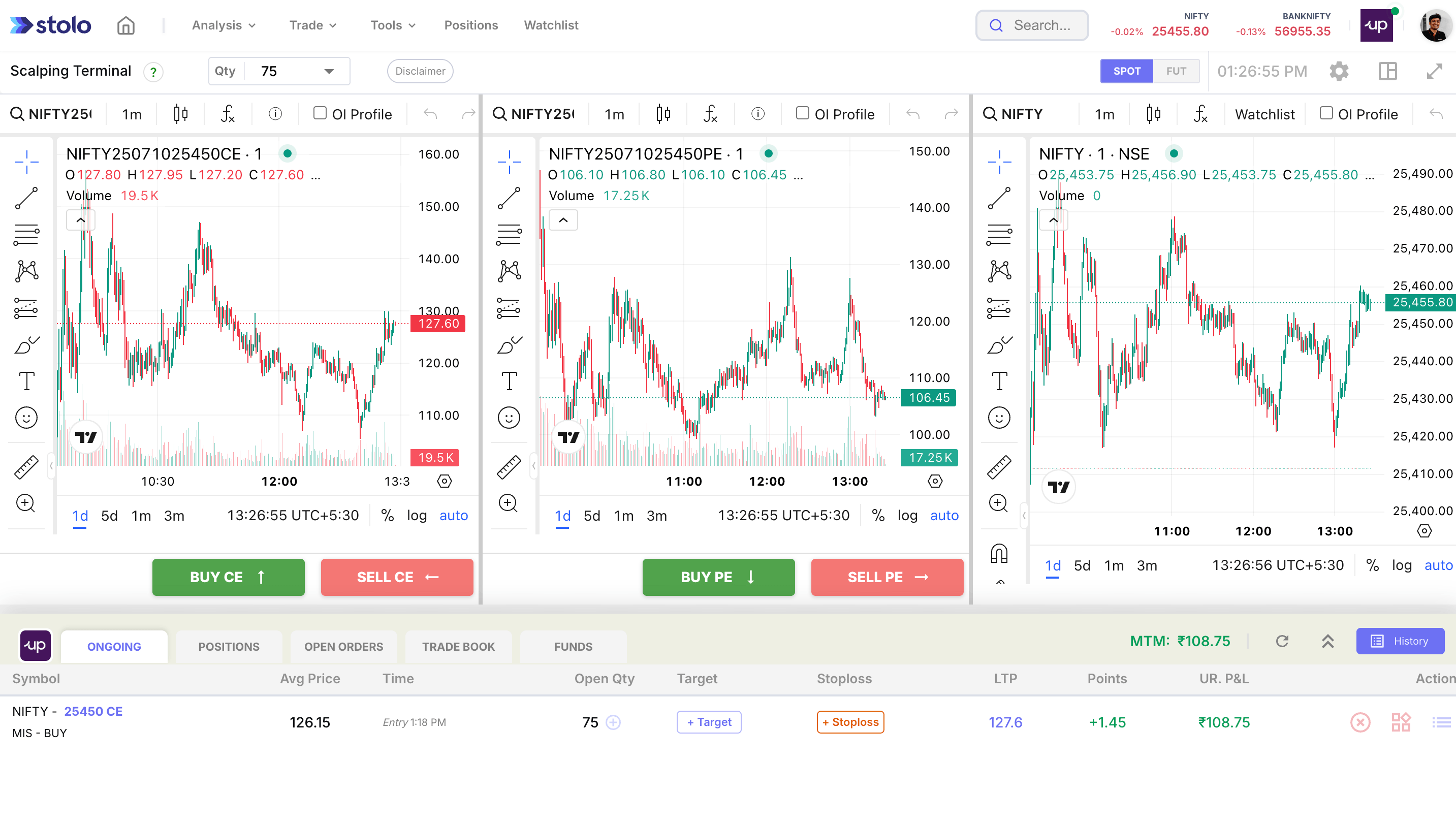
That's why Stolo integrates powerful TradingView charts for every CE, PE, and Futures instrument you select. Get the precision of professional-grade charts combined with real-time data and order execution, all in one seamless workflow.
What Are TradingView Charts in Stolo?
TradingView Charts in Stolo allow you to:
- View individual CE, PE, or Futures instruments with full charting capabilities
- Use technical indicators, drawing tools, and chart types like line, candle, or area
- Place trades directly from the chart (with a connected broker)
Whether you're spotting breakouts, tracking volatility, or reacting to premium spikes these charts give you the visual control needed to act confidently.
What You Can Chart
You can launch TradingView charts for:
- Any Call (CE) or Put (PE) strike across supported expiries
- Index and stock Futures
- Custom option instruments added manually
Each chart comes with:
- Live price ticks
- Zoom and pan functionality
- Apply trendlines, moving averages, VWAP, RSI, MACD, and more on Trading View Chart
How to Use It
- Select Trade from mega menu at your dashboard and choose TV Charts for PE,CE & Futures
- Choose instrument and strikes along with futures
- Apply your preferred indicators and chart type
- Click Buy/Sell to place a trade directly from the chart
info
Requires broker connection for trading & is available on the Flexi Trial and Pro plans. Signup Now
Why It's Useful
- For Option Traders: Track premium action visually instead of relying only on numbers
- During Volatility: Spot IV surges, price rejections, or breakouts at specific strikes
- For Futures: Apply full-fledged technical analysis before committing capital
- For Strategy Review: Look back at how CE, PE or Futures moved after your trade
Pro Tips
- Use same-strike CE & PE charts side-by-side to detect momentum shifts
- Add indicators like VWAP + RSI on futures charts for clearer entries
- Combine with Trade Journal to review trades with chart context
Frequently asked questions
What does this terminal show?
TradingView charts for the call, the put and the futures of an instrument together, so you can watch a multi-leg options position against its underlying on one screen and trade from it.
Why watch the future alongside the option legs?
The option premiums move off the underlying, but not one to one because of time decay and volatility. Seeing the futures chart next to the CE and PE charts tells you whether a premium move is the underlying or something else.
Who is it for?
Traders running spreads and straddles who want the full picture, the two legs and the driver, in one layout.
Can I add indicators to each chart?
Yes. Each chart carries the standard TradingView studies and drawing tools independently.
Can I place trades from here?
Yes, with a broker connected. Execute and manage the legs from the same screen.
When is it most useful?
Managing a spread or straddle intraday, and confirming whether a move in one leg is backed by the futures or is just decay or an IV shift.
How is this different from the multi-option TradingView terminal?
That terminal is built around adding many option legs to one chart. This one pairs the CE, PE and futures of a position specifically, so the underlying is always in view.
What plan do I need?
It is available on the Flexi Trial and Pro plans with a broker connected. See the subscription plans page.