Trader Voices
Why Smart Traders Choose Stolo?
Every trade is a small bet on a dream, backed by risk and a decision you have to own. Stolo is built for traders who bring purpose and discipline to that decision, not just numbers.
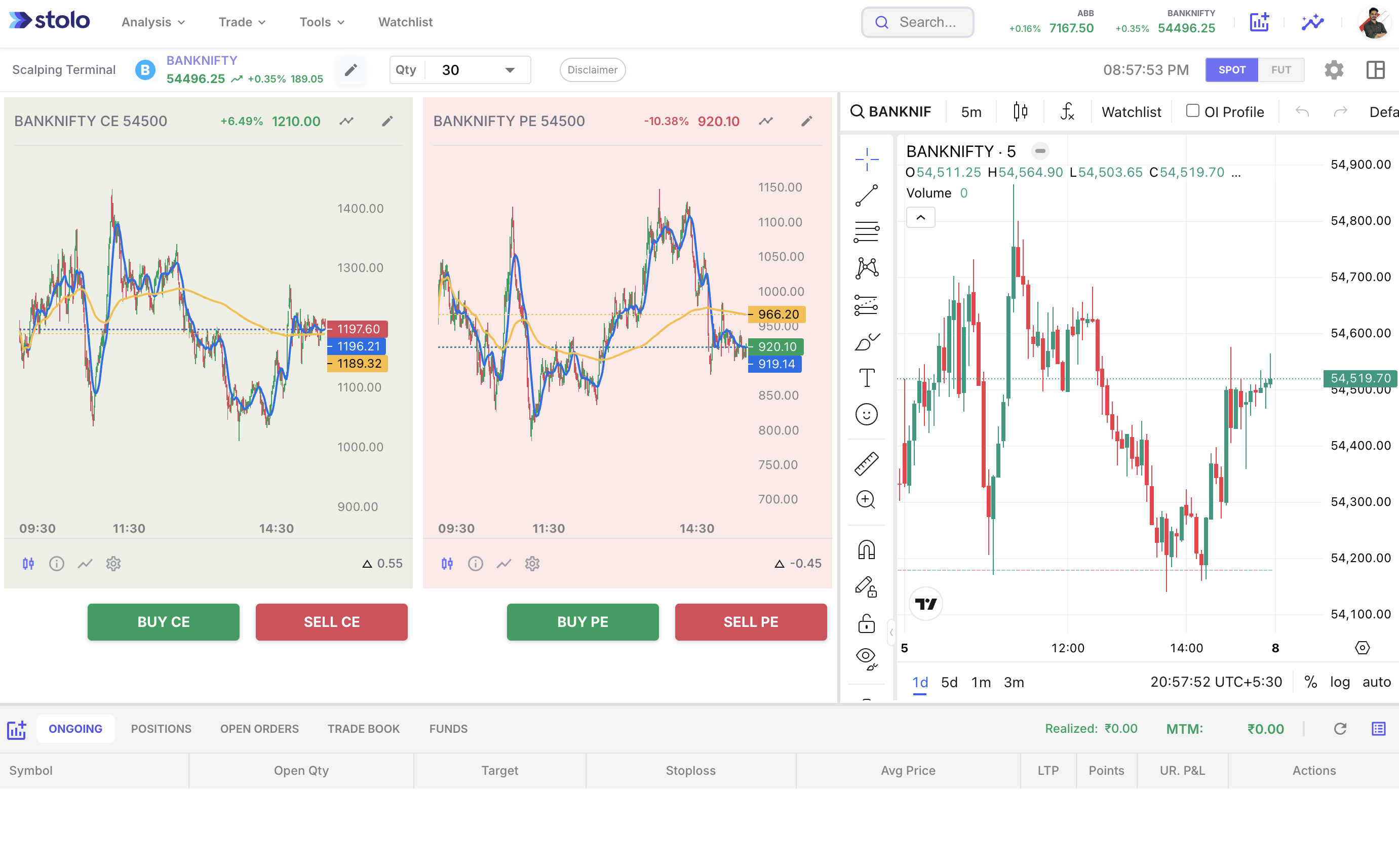
Stolo’s Options Scalping Terminal is designed for fast, efficient trading, allowing users to execute trades with a single click. The terminal lets you pre-set essential parameters like trade quantity, strike price, stop loss, and target, ensuring quick, streamlined execution. It’s ideal for scalpers who rely on speed and precision.
Paid trial from ₹199 · Full Pro access · Setup in 3 minutes

Scalping is about getting in fast and getting out faster. Generic apps are built for traders who have minutes to decide; scalpers have seconds.
Every click to navigate the menu, enter a lot size, type a stop-loss, and confirm the order eats time a scalper simply doesn't have. Skip keyboard shortcuts and you're already behind the move before you're even in the trade.
Entering lot size, stop-loss, and target manually on every trade during a volatile session is asking for errors. Without predefined rules auto-filling your parameters, each order turns into a slow, mistake-prone exercise.
When your OI analysis lives on one platform and your order entry sits on your broker app, every switch costs 10–30 seconds per trade. That's an eternity when you're trying to capture a 10-point move in BankNifty.
Even a 5-second delay on option premiums can mean entering at the wrong price or missing an exit entirely. Generic apps running on delayed or scraped feeds just aren't acceptable for high-frequency scalping.
Calling it a fast order window sells it short. A real scalping terminal is a complete workflow built for traders who move into positions quickly and get out of them just as fast.
It's a purpose-built trading interface for entering and exiting positions in seconds or minutes, capturing small price moves repeatedly across a session. It prioritises live data refresh, one-click order placement, and a minimal layout that clears out everything irrelevant during a fast trade. For Indian F&O traders, that means seeing the option chain, OI data, and the order form on a single unified screen with no context switches required.
What separates a profitable scalper from one who chronically over-pays on fills often just comes down to execution speed. Keyboard shortcuts take the mouse out of your trading workflow entirely, letting you confirm an order, switch instruments, or exit a position in under a second. For a scalper targeting 5–15 point moves in Nifty or BankNifty, that difference in execution time directly affects average fill quality and net P&L across dozens of trades per session.
Scalpers who key in lot size, stop-loss, and target manually on every trade during a volatile session are setting themselves up for errors under pressure. Predefined rules let you configure your trading parameters once (lot size, stop-loss percentage, risk-to-reward ratio) and have them auto-fill each time you open the order form. That removes one of the most common sources of in-the-moment decision fatigue and keeps your risk management consistent no matter how fast the market is moving.
Open interest shows where big money is positioned. In scalping, knowing whether OI is building or unwinding at a strike can be the difference between a 5-point gain and a 15-point stop-out. A scalping terminal that shows live OI alongside premiums gives you an informational edge that price-only tools simply cannot match. Stolo refreshes OI data directly from NSE every 3 minutes, with no scraping and no approximation involved.
Indian markets carry some of the world's highest options volumes, particularly in Nifty, BankNifty, and FinNifty weekly expiries. That creates scalping opportunities that call for a terminal designed around these specific instruments. A generic global platform won't give you the granular OI charts, PCR levels, and multi-strike views that NSE scalping demands. Stolo is built for these instruments first.
Any scalping terminal is only as good as its data source. Stolo sources market data directly from NSE, nothing scraped, nothing estimated. That means the OI values and premiums you act on are the same values the market is pricing in, cutting the risk of trading on stale information during a volatile scalp window. See how Stolo approaches open interest analysis for a deeper look at the data layer.
Every feature in the Stolo terminal is optimised for quick analysis, quick entry, and quick exit, the three fundamentals of disciplined scalping.

Place orders, set stop-loss, and manage auto-trail directly from Stolo, no switching to your broker app required. All 10+ supported brokers work in real time.

Navigate the terminal, submit orders, and exit positions using keyboard shortcuts, no mouse required. Scalpers who use shortcuts execute faster and more accurately during high-speed moves.

Set your lot size, stop-loss percentage, and target ratio once. Every order form auto-fills with your saved rules so you never enter a trade with wrong parameters under pressure.

See open interest changes and option premiums together, and spot institutional positioning as it happens, before you enter rather than after the move has already played out.

PCR, OI buildup, gamma exposure, IV surface, all sourced directly from NSE. Built specifically for Nifty, BankNifty, FinNifty, and 191 F&O stocks.

Review every scalp after the session: entry timing, exit quality, slippage, and whether your predefined rules were followed consistently across each trade.
Two features that separate traders who execute well under pressure from those who hesitate at the wrong moment.
Execute the entire trade cycle, entry, management, and exit, without taking your hands off the keyboard. Built for scalpers who cannot afford the cost of reaching for a mouse during a fast move.
Configure your trading parameters once, before the session begins. Every order form auto-fills with your rules so that every scalp starts with the same disciplined structure regardless of how fast the market is moving.
Default lot size: set your standard position size per trade so you never accidentally size up during a reactive, emotionally-charged entry
Stop-loss percentage: define your max loss per scalp as a percentage, automatically applied to every order form so discipline is built into the workflow
Target ratio: lock in your minimum risk-to-reward expectation so every trade starts with a target that makes structural sense before you click buy
Auto-trail settings: configure how trailing stops follow a winning scalp so you capture the move without manually adjusting stops mid-trade
From pre-market preparation to post-session review, Stolo gives scalpers a complete workflow with keyboard shortcuts and predefined rules built into every step.
Start Trial from ₹199Before the session opens, set your predefined rules in the terminal: default lot size, stop-loss percentage, and target ratio. Then open the OI analysis charts, check where open interest is concentrated on the current expiry, note the PCR trend, and identify the key strikes you plan to watch. Rules configuration plus an OI read gives each scalp a structural foundation instead of a reactive entry.
When your setup appears, use keyboard shortcuts to open the order form. Your predefined rules have already filled in the lot size, stop-loss, and target, so confirm with Enter and you're in the trade. When your exit signal fires, hit the exit shortcut without navigating through any menu. Auto-trail handles stop management while the trade runs, so your hands never leave the keyboard from entry to close.
After the session, open order analysis and the built-in journal. Review every trade: entry timing, exit quality, whether your predefined rules were followed, and what OI was doing at the moment you entered. Scalpers who review consistently build a pattern recognition no indicator can replicate. Do it daily and reactive trading turns into a structured, improvable skill over time.
The gap between a purpose-built scalping terminal and a generic app becomes obvious the moment markets start moving fast.
| Capability | Generic Trading App | Stolo Scalping Terminal |
|---|---|---|
| Keyboard shortcuts for order execution | Mouse-only workflow | Full keyboard navigation built in |
| Predefined rules for lot size, SL, target | Enter manually every trade | Auto-fills from your saved rules |
| Live NSE OI data | NSE-authorised, refreshed every 3 mins | |
| Broker-integrated order placement | Switch to broker app to trade | Direct from the Stolo terminal |
| Stop-loss & auto-trail in terminal | Built into the order form | |
| OI + premium on one screen | Unified scalping view | |
| Post-trade journal & review | Manual spreadsheet needed | Built-in order analysis & journal |
| NSE F&O coverage | Limited instruments | 191 stocks + all major indices |
Join 40,000+ Indian traders who replaced fragmented setups with a single, structured workflow built for fast-moving markets.

Start with OI charts and PCR before your first scalp. Set your predefined rules so that when a setup appears, the order form is ready, no manual inputs needed during the trade itself.


Use keyboard shortcuts to open the order form and confirm entry, no mouse, no delays. Your predefined rules have already filled in the parameters, so you can focus only on the trade itself.

After the session, order analysis shows every scalp with timing, P&L, and stop adherence. Reviewing whether you followed your predefined rules each day is what turns reactive scalping into a repeatable edge.
Each strategy has a specific trigger, a specific OI confirmation, and a specific exit, all visible in real time inside the Stolo scalping terminal.
Trade in the direction where fresh open interest is accumulating at key strikes. When call OI at a resistance level starts unwinding while put OI builds beneath it, the market is signalling a sustained move. Stolo's live OI charts surface this shift as it happens, not 15 minutes later once the move has already priced in. Watch three consecutive 3-minute OI candles for a consistent directional build before entering the position.
Capture the first 3–5 minutes of a directional move after a consolidation zone. The entry trigger is a breakout on the underlying index combined with accelerating OI in the direction of the move. Stolo's PCR chart confirms whether the breakout has institutional backing or is a retail squeeze that will reverse quickly. Momentum scalps entered without OI confirmation have a significantly lower probability of reaching their target before reversing.
On expiry day, OTM option premiums collapse rapidly in the final 90 minutes as time value approaches zero. Scalpers use this predictable decay to place short premium trades at strikes that OI data shows are unlikely to be breached before close. Stolo's IV surface and live OI highlight which strikes are over-priced relative to their realistic expiry range, making the selection process systematic rather than speculative.
When the Put-Call Ratio reaches an extreme, well above 1.5 or below 0.5, markets frequently reverse as the positioning imbalance unwinds. Scalpers use PCR extremes as a contrarian entry trigger with a tight stop just beyond the extreme level. Stolo's PCR chart with historical context makes these readings visible as they form, rather than hours after the reversal has already begun and the opportunity is gone.
Not all market hours offer scalping opportunities. These four windows consistently produce the best conditions in Nifty and BankNifty; outside them, it's mostly noise.
The first 30 minutes after market open are the most volatile of the session. Overnight global cues, gap opens, and the absence of established intraday levels create fast, large moves. This window demands the fastest execution possible, so keyboard shortcuts aren't optional here. Use Stolo's OI chart from the very first 3-minute candle to read institutional direction before entering.
After early volatility settles, a clear directional trend often forms between 11 AM and noon. OI has had time to build meaningfully, and the PCR gives a cleaner read on session bias. For scalpers who prefer confirmation over early entries, this window produces the most consistent momentum setups with the least noise relative to the potential move size.
After the mid-session lull, markets frequently reactivate with a second directional push. This push often retests the morning's key level, creating OI-backed scalping setups at already-established support and resistance strikes. Stolo updates OI data continuously through this window, so the picture you see is current, not carried over from two hours ago when the morning session was active.
In the final 45 minutes, especially on expiry days, premium decay accelerates dramatically. OTM options can move 50–100% in minutes. Stolo's OI data shows which strikes carry significant open interest that must be unwound before close, a direct indicator of where the market is likely to gravitate during this high-risk, high-reward window.
Three views that together form a complete scalping session, from pre-market OI read to order execution to post-session debrief.
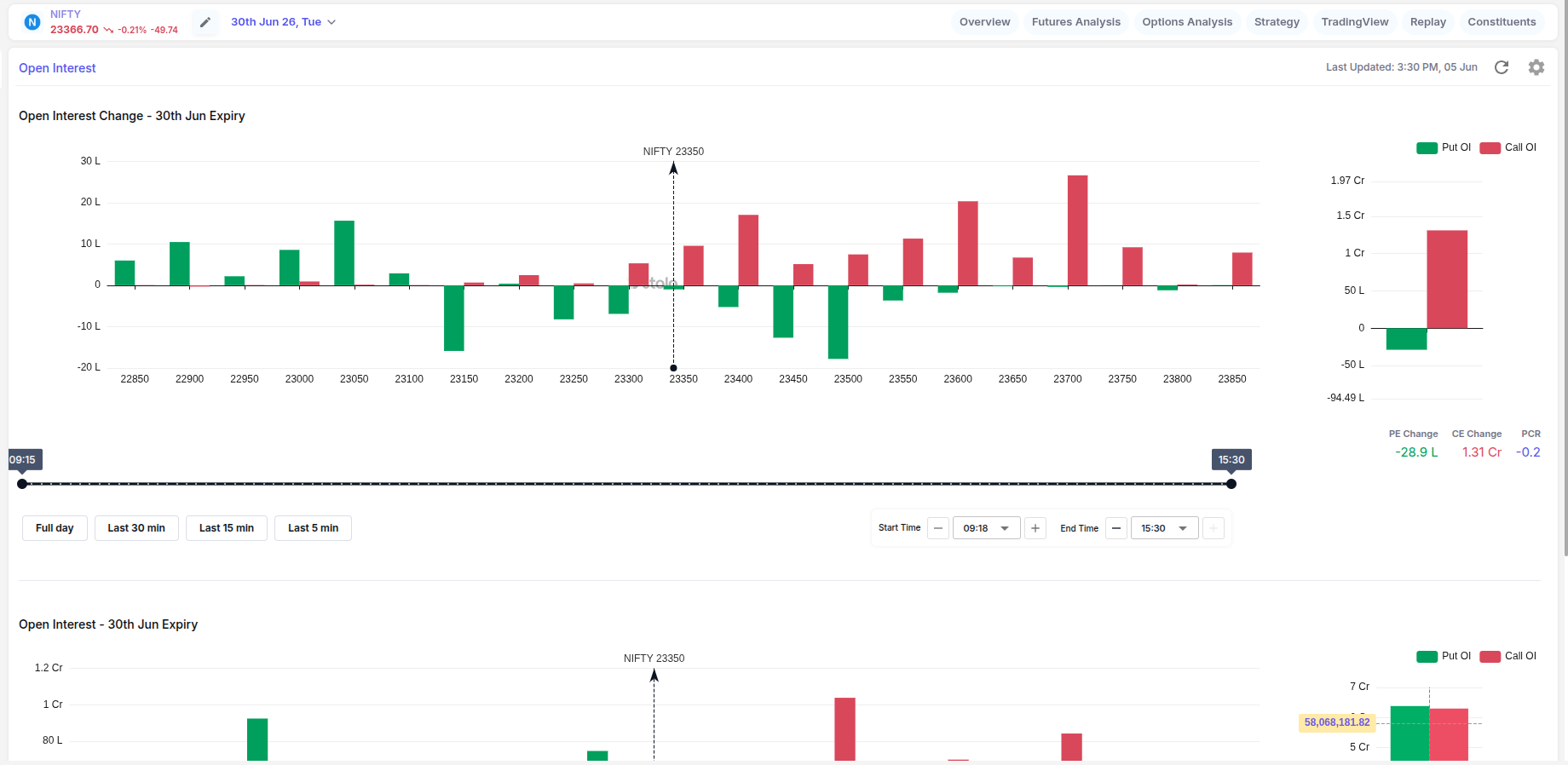
Before the first scalp, review the live OI chart to see where institutional money is positioned. This 5-minute pre-market read establishes the structural bias for the entire session, and it's where disciplined scalping starts.
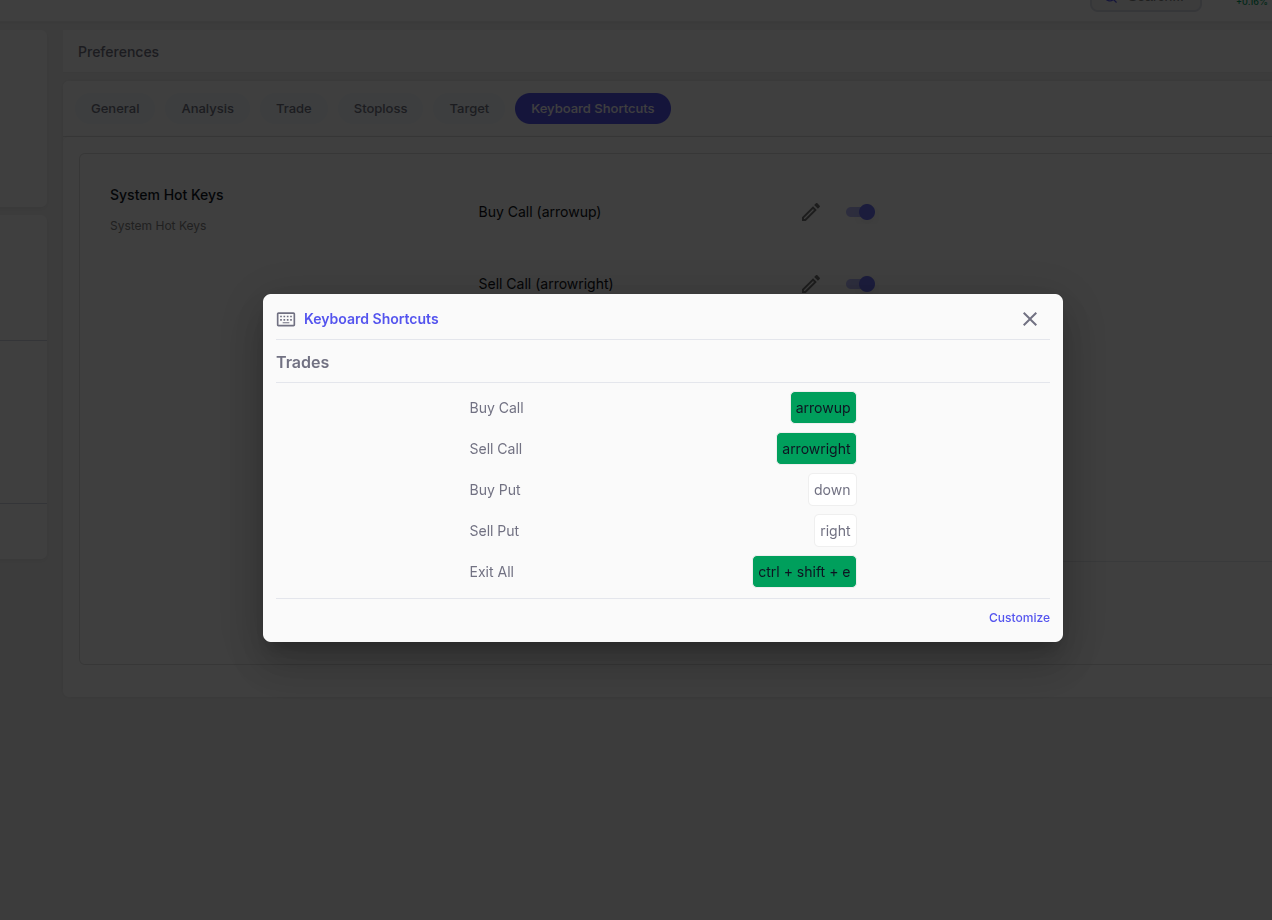
The order form pre-fills with predefined rules. A single keyboard shortcut submits the trade, no mouse, no delays between seeing the setup and being in the position at the right price.
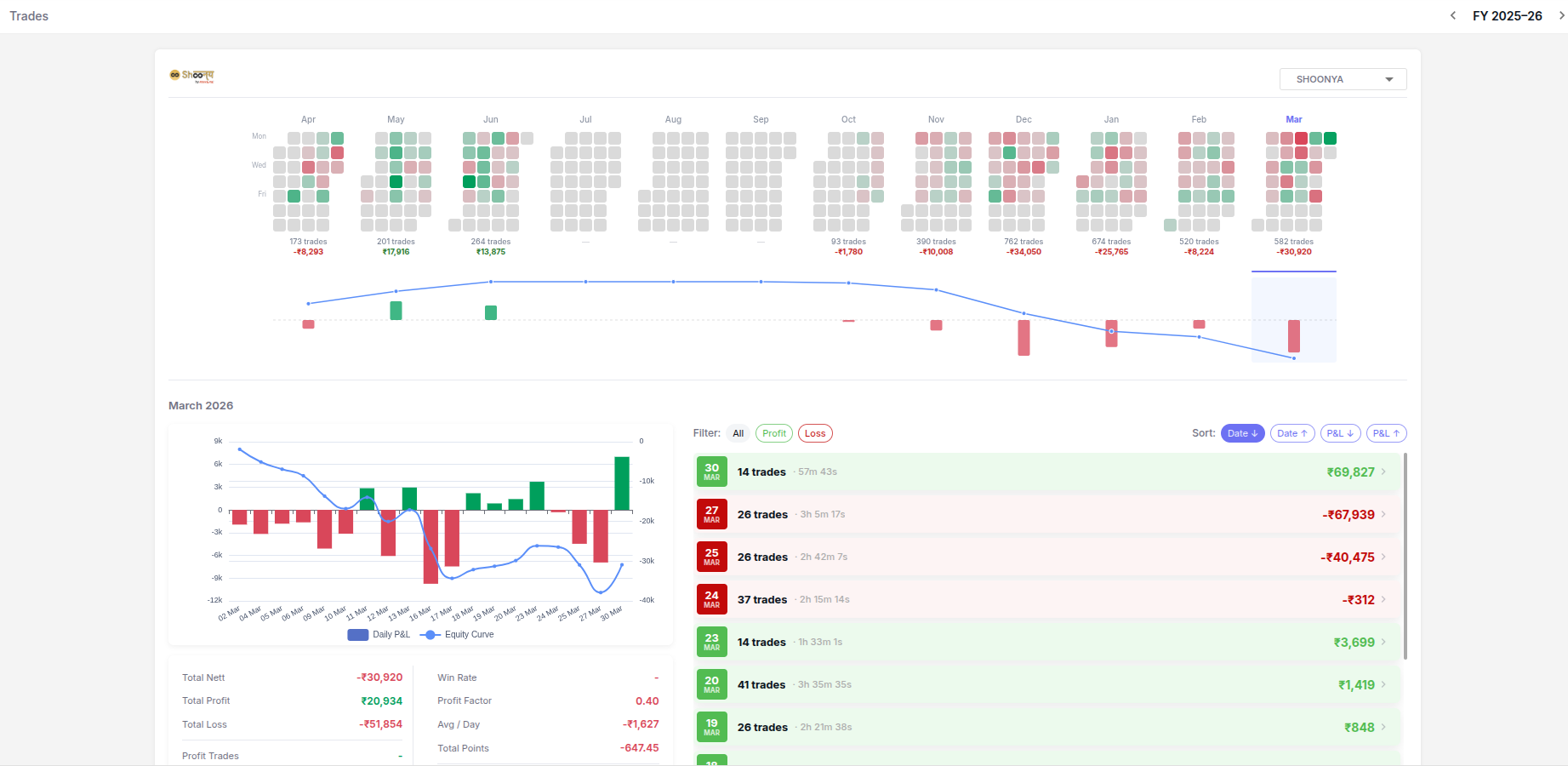
After every session, the order analysis view shows each scalp with entry timing, exit quality, and P&L versus your stop and target. The daily review loop converts session experience into a tighter, more repeatable edge over time.
Predefined rules in Stolo enforce your per-trade risk automatically, but the discipline to set them correctly, and to hold a daily loss limit, starts before the market opens.
Define the maximum loss acceptable per session as an absolute amount. Once reached, stop trading for the day without exception. Predefined rules in Stolo cap per-trade risk, but the daily limit itself requires self-imposed discipline, since no platform will close your terminal for you when you hit that number.
Each scalp should risk a fixed, small percentage of your total trading capital. Predefined rules in Stolo auto-fill your lot size and stop-loss based on this percentage, removing the temptation to size up after a winning streak or trade emotionally after a stop-out.
Widening your stop mid-trade because the position is briefly underwater is the single most common way scalpers convert manageable losses into account-damaging ones. Set the stop using predefined rules and leave it untouched. Let the outcome teach you, not your emotional state in the middle of a losing position.
A 50% win rate with 1:2 risk-to-reward is more sustainable than chasing a 70% win rate on poor R:R setups. Predefined rules lock in your target ratio before every entry so you never accidentally take a trade where the math does not support the risk being taken.
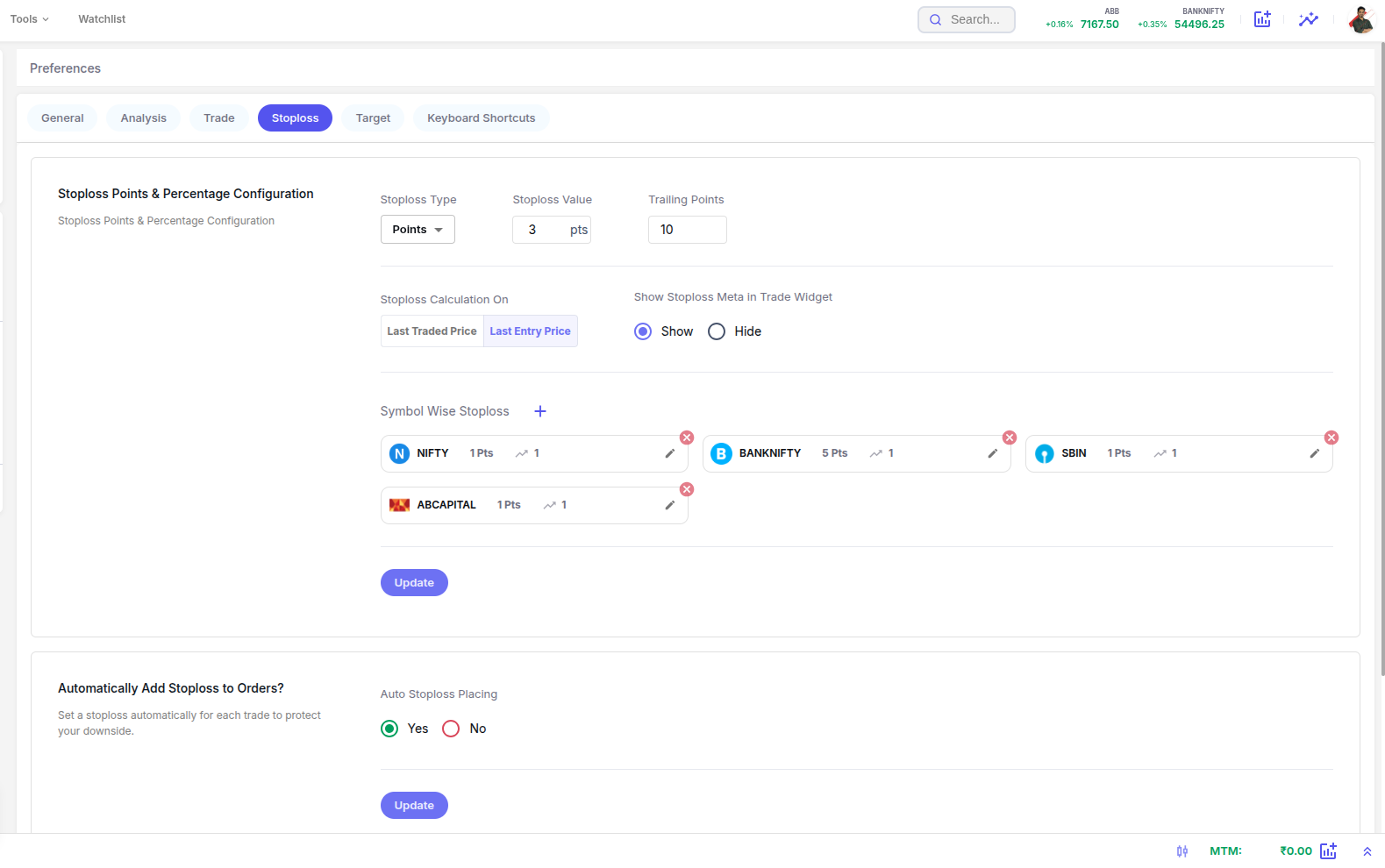
Each of these is avoidable with the right terminal, the right predefined rules, and one daily review habit. Most traders repeat them for months before recognising the pattern.
Every trade where you manually decide lot size and stop-loss under the pressure of a live move is a trade where emotion influences the outcome. Predefined rules in Stolo take that variable out of the equation entirely: risk decisions get made once, calmly, before the session, and applied automatically throughout the day.
Scalpers who rely on mouse navigation to place orders consistently miss the best entries and exits. By the time you navigate to the order form, fill in parameters manually, and click Confirm, a 10-point scalping window may have already opened and closed. Keyboard shortcuts in Stolo compress the decision-to-execution time to under a second.
Scalping in the direction of a price move without checking whether open interest confirms the direction is guessing, not trading. A move with fresh OI building behind it sustains long enough to reach a target. A move on thin or declining OI reverses quickly. Stolo's OI chart makes this distinction visible before you enter, not after you're already in a losing trade.
Not every market hour offers scalping setups. Forcing trades during the mid-session lull between 12:30 and 1:30 PM leads to small, choppy moves that hit stop-losses without ever giving targets. Recognising when not to trade is its own specific skill, one that requires the patience to wait for the time windows and OI conditions that match your predefined strategy.
Widening your stop mid-trade because the position is briefly underwater turns a disciplined scalp into a hope trade. The moment you widen a stop for a reason outside your original plan, the structural integrity of the trade is broken. Set the stop using predefined rules in Stolo and do not adjust it intra-trade, regardless of how the position moves against you.
Scalpers who do not review their trades repeat the same mistakes across hundreds of sessions without ever identifying the pattern that is costing them. Stolo's order analysis module shows every scalp with entry timing, exit quality, and P&L relative to your stop and target. Used daily, this review turns a recurring losing pattern into a visible data point you can act on.
Questions?
Direct answers to the most-searched questions about scalping terminals, keyboard shortcuts, predefined rules, and how Stolo helps Indian F&O scalpers trade NSE markets faster
Trader Voices
Every trade is a small bet on a dream, backed by risk and a decision you have to own. Stolo is built for traders who bring purpose and discipline to that decision, not just numbers.

My first impression of your site, "K.I.S.S."..... Simple yet effective...uncluttered and has all the ingredients a trader actually needs not the nonsensical ones... great job
These are unedited testimonials from traders in our Telegram community. Photos shown are AI-generated and used for representation only.

You have something unique in your platform that has changed my trading. I have used Quantsapp earlier didn't find it useful. I have tried opstra, sensibull etc.
These are unedited testimonials from traders in our Telegram community. Photos shown are AI-generated and used for representation only.

Dear Sir, I am really impressed with the user interface and multiple other facilities for option traders.
These are unedited testimonials from traders in our Telegram community. Photos shown are AI-generated and used for representation only.
Got a question or a feature you wish existed? Drop it in our Telegram community, the Stolo team is right there reading every message.