Trader Voices
Why Smart Traders Choose Stolo?
Every trade is a small bet on a dream, backed by risk and a decision you have to own. Stolo is built for traders who bring purpose and discipline to that decision, not just numbers.
Download four years of minute-level NSE spot, futures and options data, expired contracts included, as CSV files or through the Developer API. Viewing is included with your plan. Downloads use Stolo Tokens, 1 per symbol per trading day.
Paid trial from ₹199 · Full Pro access · Setup in 3 minutes
The data exists. Getting it out in a clean, minute-level format, with expired contracts included, is the part that eats your weekend.
NSE's public bhavcopy gives you one row per contract per day. That works for a closing-price check, but it can't show how a strike moved between 9:15 and 15:30.
Many broker APIs only serve instruments that are still trading. The strike that was at the money three expiries ago, the one your backtest actually needs, is often gone.
Scripts that copy numbers off websites break when a layout changes. They leave gaps you only notice after a backtest looks too good to be true.
Data subscriptions often charge the same every month whether you pull one week of candles or a full year. Occasional research ends up paying full-time prices.
Viewing the data in the Stolo app only needs a plan. Downloading it as files, or pulling it into your own code, needs a plan and Stolo Tokens.
Plans start at ₹199
Take a Flexi Trial or Pro plan and you can open every historical screen in the Stolo app. Look at as much data as you like. Viewing never uses tokens.
Plans start at ₹199, plus tokens for what you download
To save the data as CSV files, or pull it into your own code with the API, you need a plan plus Stolo Tokens. Tokens are only used for the past trading days you download.
NSE historical data download means taking recorded data from past sessions (OHLC candles, volume, open interest and option chain snapshots) out of a platform and into your own files or code. Viewing data shows you what happened. Downloading it lets you test a rule against hundreds of sessions in a spreadsheet, a Python notebook or your own backtester.
On Stolo, downloads come from the same NSE-authorised database that powers the app's historical screens, so the numbers in your CSV match what you see on the chart. Read where Stolo's data comes from.
Read the API DocsEvery download draws on four years of NSE data. That's enough sessions to cover several volatility regimes, budget days and hundreds of expiries.
Candles start at one-minute resolution, with OHLC, volume and OI in every row. Choosing a finer or coarser candle size doesn't change the token cost.
Pull the index or stock spot, the near-month future and any option strike. Coverage spans the entire NSE F&O segment, not just Nifty and Bank Nifty.
Past expiries stay downloadable after settlement. You can pull the strike that was ATM months ago, not just the contracts trading today.
No-code CSV files for research, a REST API for anything automated, and one token balance behind both.
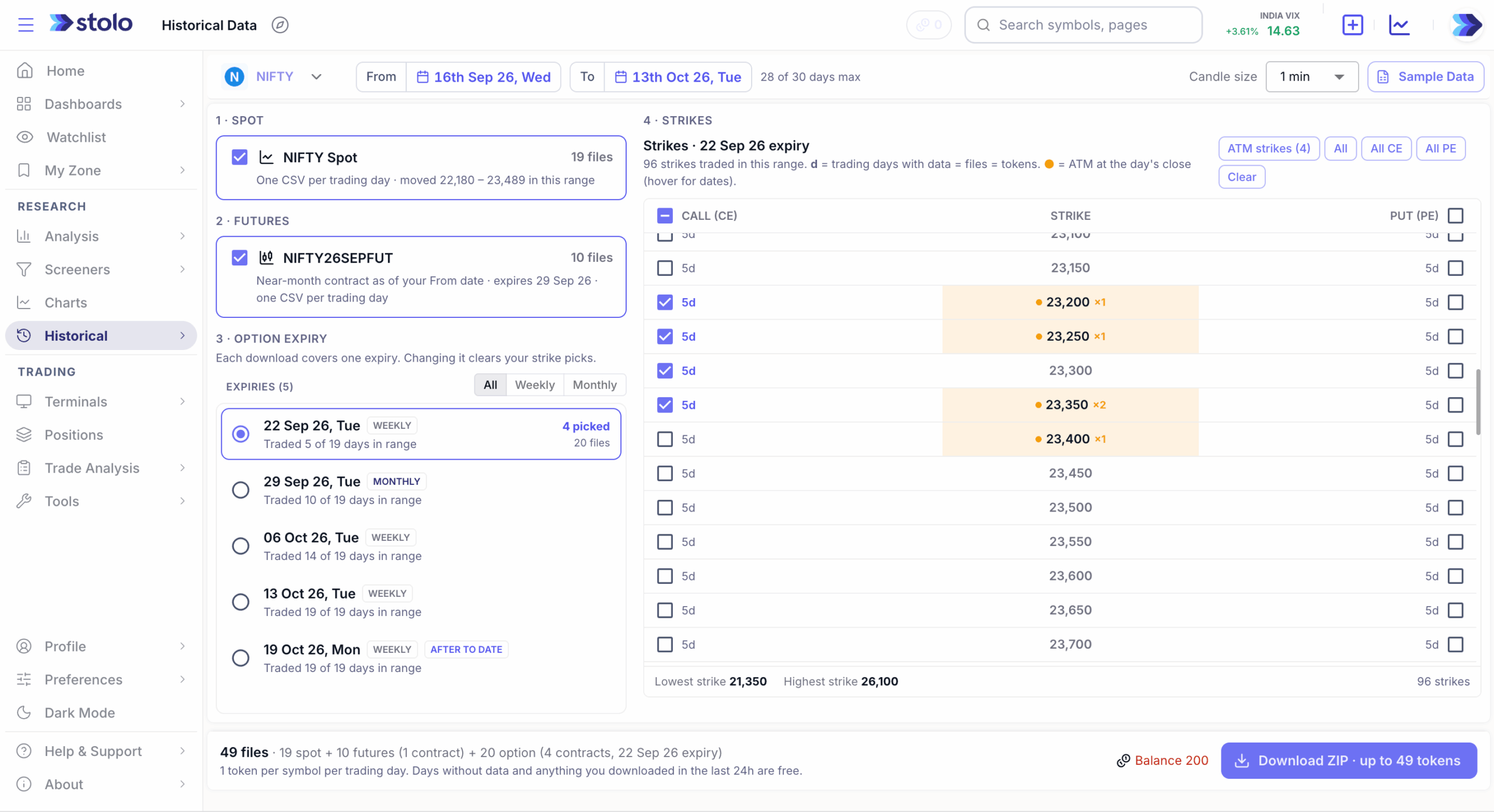
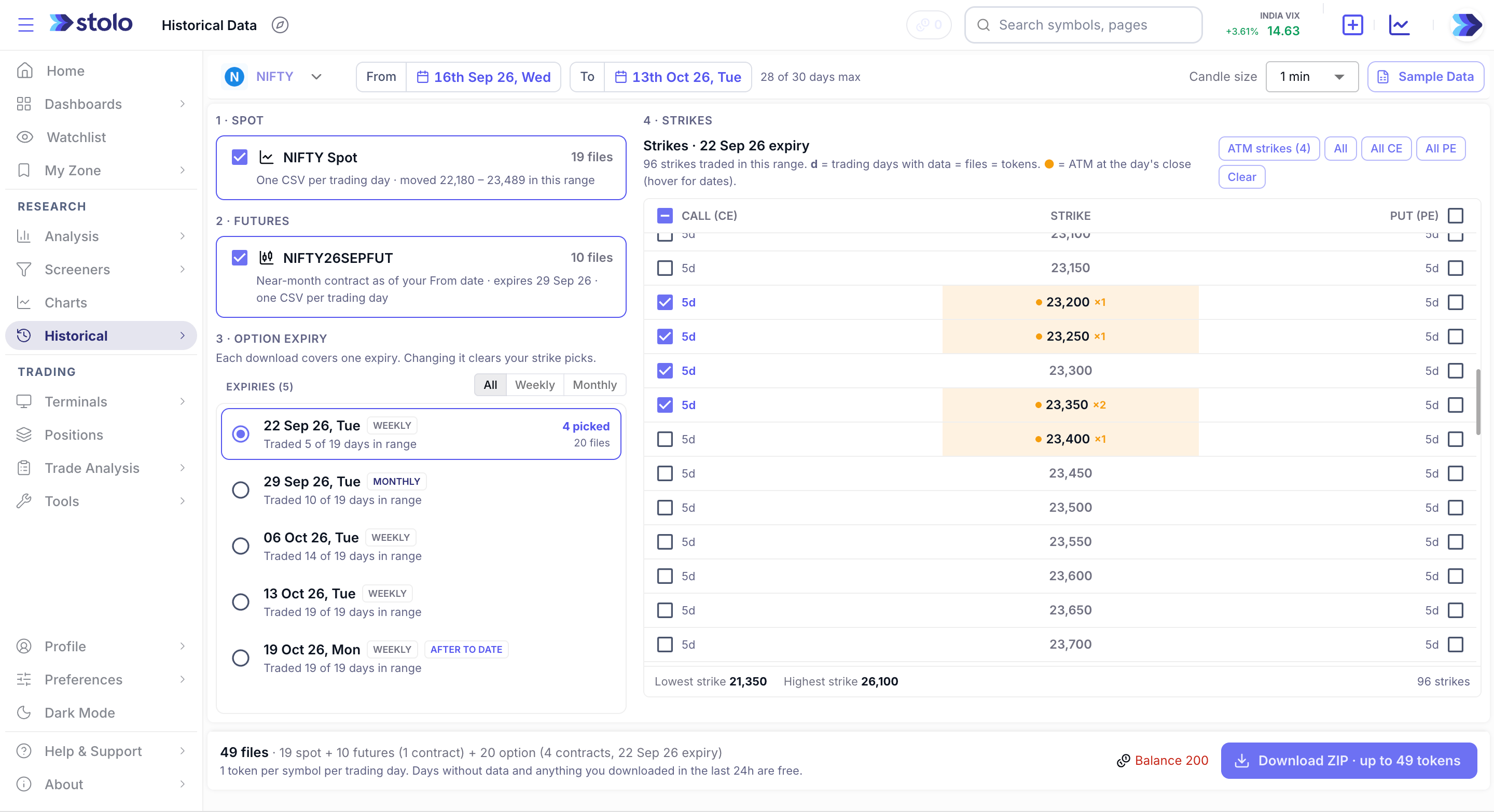
Open Historical Data in the Stolo app (Research, then Historical). Pick a symbol, a date range of up to 30 days and a candle size, then tick what you want: the spot series, the near-month future and option strikes for one expiry. Stolo prepares a ZIP in the background and emails you a download link, valid for 2 hours.
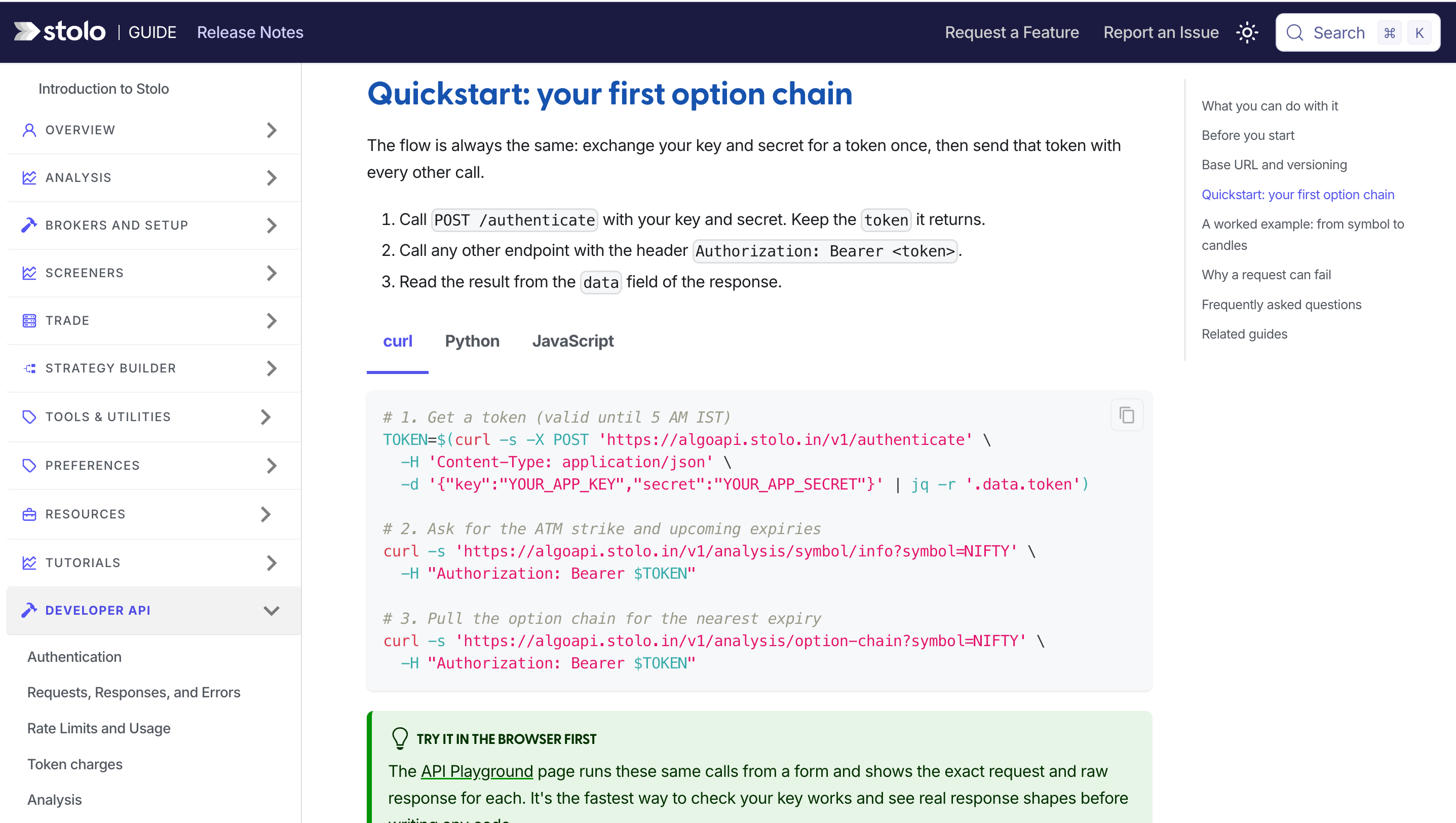
The Stolo Developer API serves the same NSE F&O data over HTTPS. Authenticate once with your app key and secret, then call the symbol info, option chain and candle endpoints from Python, JavaScript or anything that speaks HTTP.
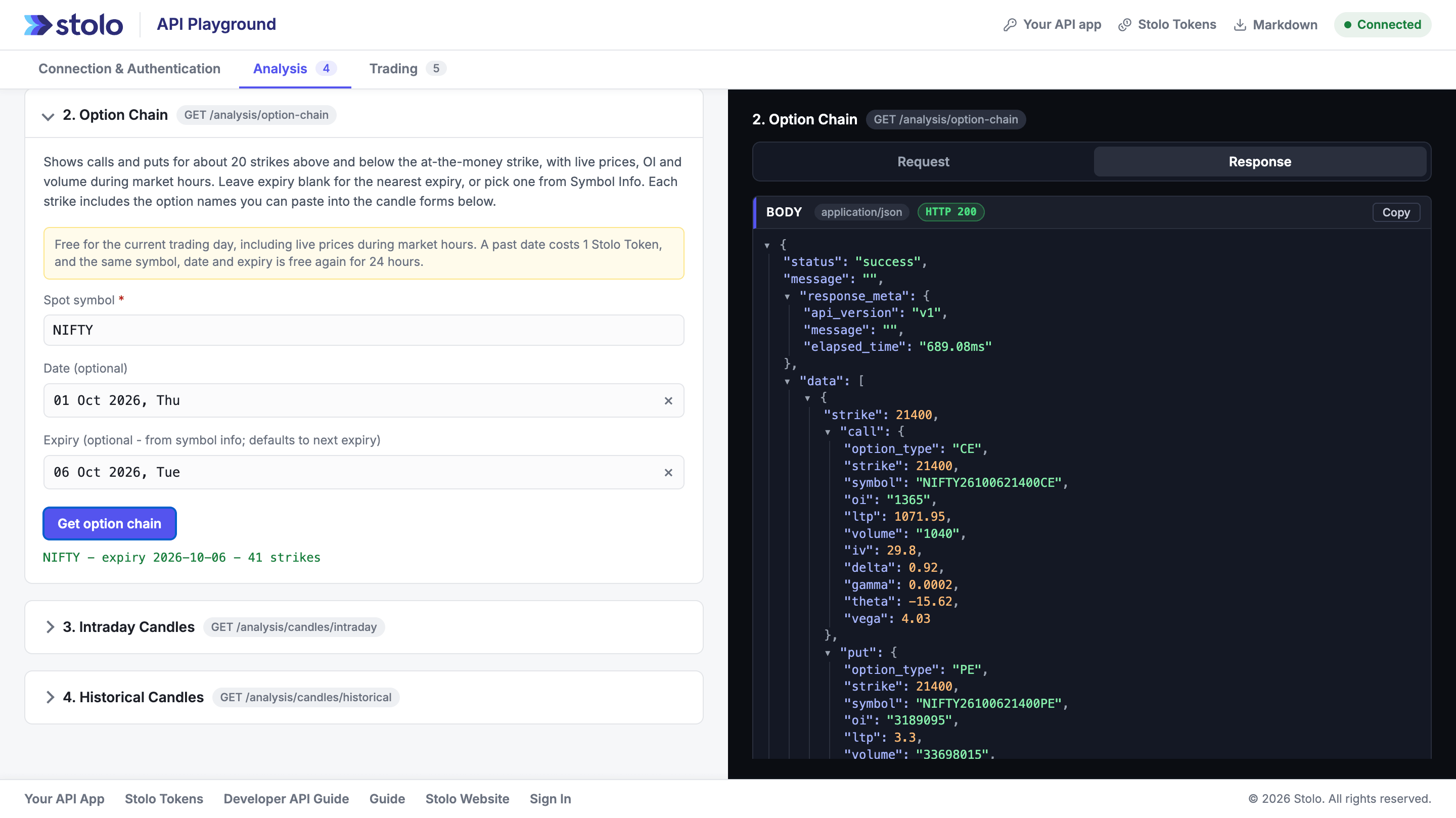
The API Playground runs the same calls from a form and shows the exact request and raw response for each one. Use it to check that your app key works and to see real response shapes before you write a line of code.
CSV downloads and API calls draw from the same Stolo Tokens balance. Tokens are a one-time purchase, not a subscription. Larger packs cost less per token, and tokens never expire.
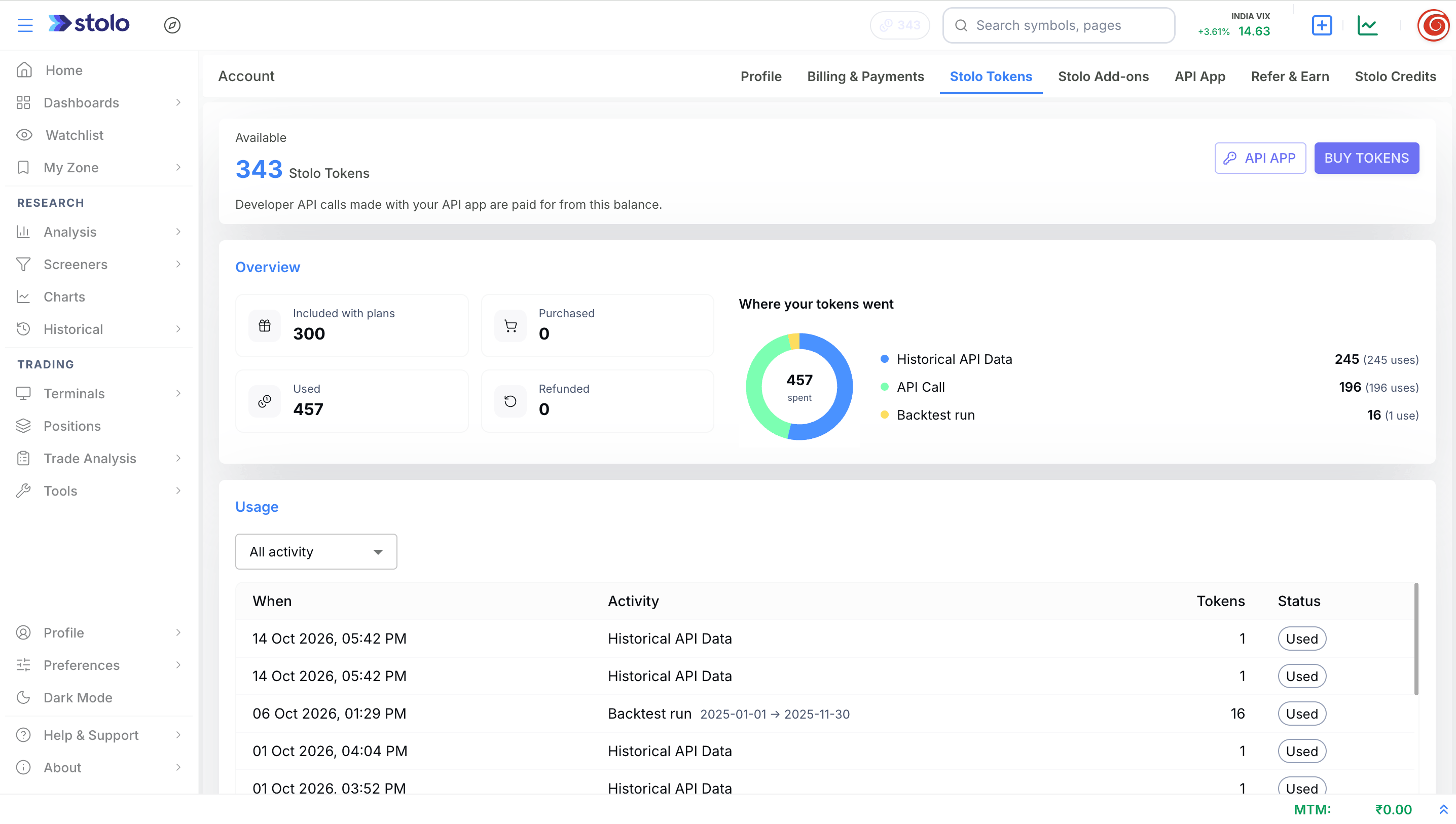
Every download request lands in one of four outcomes. Knowing which one you're in keeps your token spend predictable.
Today on a trading day, or the last trading day on weekends and market holidays. Data for the current trading day never costs tokens.
One symbol for one past trading day costs 1 token, whether you take 1-minute or 15-minute candles. Weekends, holidays and days with no data for that contract are not charged.
Once a symbol and day is charged, pulling it again within 24 hours costs nothing. The window runs from the first charge and doesn't extend.
If your balance can't cover the request, nothing is charged. Failed downloads and failed API calls are refunded automatically, and each refund shows in your ledger.
| Request | Tokens |
|---|---|
| NIFTY 25100 CE, Monday 14 to Sunday 20 September | 5 (Saturday and Sunday aren't charged) |
| The same range again, an hour later | 0 |
| 17 to 24 September, later the same day | 4 (17 and 18 are already paid) |
| 3 NIFTY strikes for one weekly expiry, 5 trading days each | 15 |
| 10 option symbols over 20 trading days | 200 |
More examples, including option chain and symbol info requests, in the token charges guide.
From a fresh account to a ZIP of CSVs in your inbox. Viewing works from step one. Tokens only come in when you download.
Start a Flexi TrialAutomating this? The Developer API follows the same token rules.
Start a Flexi Trial from ₹199 or a Pro plan. Either one unlocks every historical screen in the app, and an active plan is also required for downloads and API access. Compare the plans.
Top up from the buy tokens page. Packs are a one-time purchase, bigger packs cost less per token, and unused tokens never expire.
In the app, go to Research, then Historical. Choose the symbol, a date range of up to 30 days and the candle size you want.
Select the spot series, the near-month future, and option strikes for one expiry. Quick picks cover ATM strikes, all calls or all puts, so you don't have to tick strikes one by one.
The confirm screen lists every file, the tokens each costs, anything already paid for in the last 24 hours, and your balance. If you're short, it tells you by how much, and nothing is charged until you confirm.
Stolo emails you a download link, valid for 2 hours, with one CSV per symbol per trading day. Past sessions never change once they close, so save the files and you'll never pay for the same day twice.
Where each source stands on the data options traders actually need to download.
| Feature | Stolo | NSE Bhavcopy | Broker APIs |
|---|---|---|---|
| Minute-level candles for options | |||
| Expired options contracts | |||
| Option chain for any past date | |||
| Open interest with every candle | |||
| 4 years at 1-minute resolution | |||
| CSV download without code | |||
| REST API access | |||
| Pricing | Plan + 1 token per symbol-day | Free, end-of-day only | Varies by broker |
| NSE-authorised source |
Partial means coverage varies by provider, contract type or resolution. Bhavcopy carries one end-of-day row per contract.
Everything this page refers to, in one place.
Questions?
Direct answers on downloading NSE historical data as CSV or through the API, and how Stolo Tokens are charged
Trader Voices
Every trade is a small bet on a dream, backed by risk and a decision you have to own. Stolo is built for traders who bring purpose and discipline to that decision, not just numbers.

My first impression of your site, "K.I.S.S."..... Simple yet effective...uncluttered and has all the ingredients a trader actually needs not the nonsensical ones... great job
These are unedited testimonials from traders in our Telegram community. Photos shown are AI-generated and used for representation only.

You have something unique in your platform that has changed my trading. I have used Quantsapp earlier didn't find it useful. I have tried opstra, sensibull etc.
These are unedited testimonials from traders in our Telegram community. Photos shown are AI-generated and used for representation only.

Dear Sir, I am really impressed with the user interface and multiple other facilities for option traders.
These are unedited testimonials from traders in our Telegram community. Photos shown are AI-generated and used for representation only.
Got a question or a feature you wish existed? Drop it in our Telegram community, the Stolo team is right there reading every message.